


RepairSolutionsPRO
3.936.00 Reviews
App Specs
- Version
- 2.26.1
- Updated On
- License
- Free
- Downloads
- 50,000+
- Developer
- Innova Electronics Corporation
- Categories
- Auto & Vehicles
- Platform
- Android
Screenshots

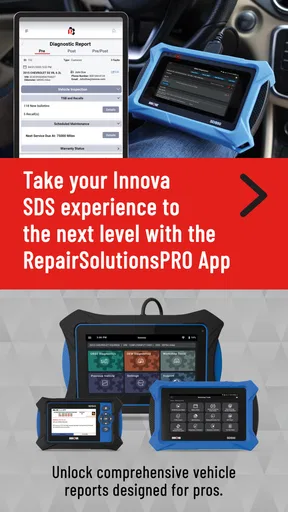
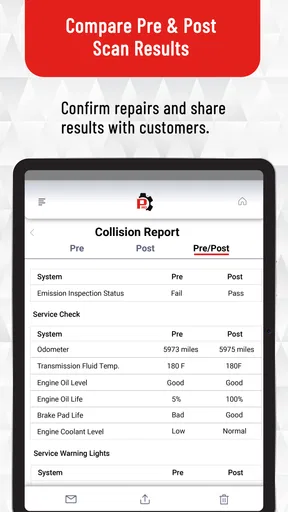
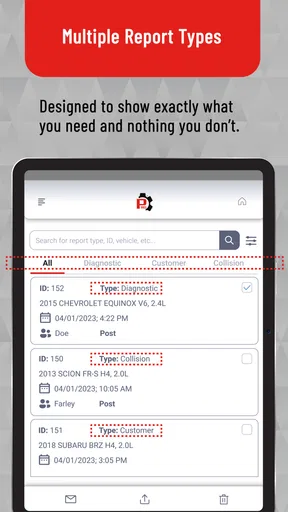
 Analysis by AppCompare
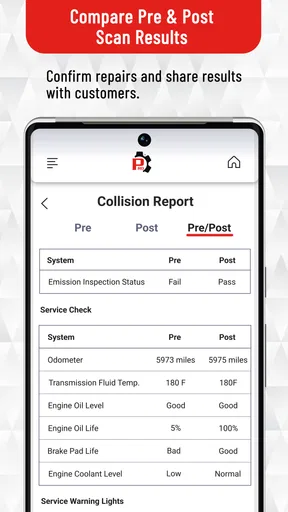
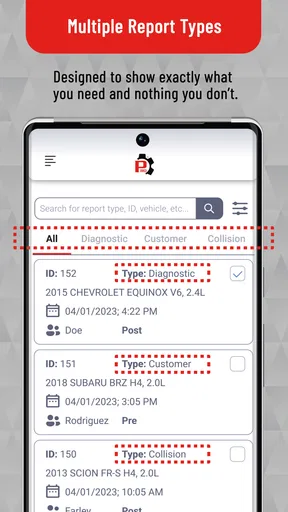
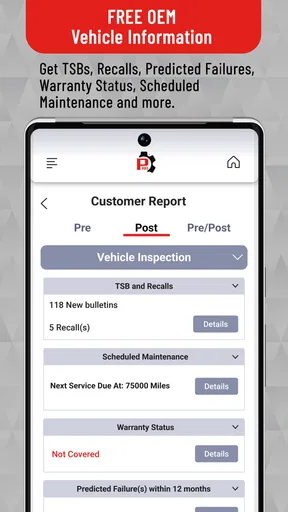
RepairSolutionsPRO is the kind of automotive app I would reach for when a dashboard warning appears and I want more context before deciding what to do next. Developed by Innova Electronics Corporation, it sits in the Auto & Vehicles category and is aimed at people who want repair information connected to vehicle diagnostics rather than a bare fault-code lookup. I found its biggest appeal in the way it tries to turn a confusing warning light into a more understandable starting point for a repair conversation.
That distinction matters. A diagnostic app can be useful without being a complete repair shop, and this one makes the most sense when I treat it as an information and decision-making tool. It can help me organize what the vehicle is reporting, think through likely next steps, and communicate more clearly with a technician. It is not a substitute for physical inspection, mechanical experience, or a proper repair when the problem involves safety-critical systems.
How the connected experience feels in everyday use
I find the connected side of this workflow most useful when I treat it as a bridge between noticing a problem and deciding who should handle it—not as a promise of an instant fix. Before I begin, I gather the warning light and driving symptoms so the information has context. That preparation also makes it easier to explain the situation when another person needs to take over.
Connectivity is part of the practical workflow
The experience is most useful when the phone, vehicle information, and app services work together at the moment I need them. If I am standing beside a car with a warning light on, I do not just want a definition copied from a general search result. I want a path from the vehicle’s reported issue toward sensible troubleshooting. That is where a connected repair-information app can save time, especially when I am trying to decide whether the car is safe to drive, whether I should arrange professional help, or whether I need to gather more information first.
In practice, this also means I would avoid treating the app as something to test for the first time during an urgent breakdown. Connectivity can affect how quickly information appears and how smoothly the workflow continues. My advice is to open the app at home, become familiar with its layout, and understand what information it expects before relying on it at the roadside. That small preparation step is more valuable than assuming every diagnostic question can be solved instantly in a stressful situation.
The app’s professional positioning is visible in its focus. RepairSolutionsPRO is not presented as a general driving companion, fuel tracker, navigation tool, or maintenance calendar. Its purpose is narrower and more useful for diagnosis-related situations. That focus keeps the experience relevant when I already have a vehicle problem, but it also means casual drivers may not find much reason to keep opening it between repairs.
A realistic roadside scenario
Imagine I am leaving work and notice the check-engine light has appeared. The car still starts and moves, but I do not know whether I am looking at a minor emissions issue or something that could worsen quickly. In that situation, I would use the app to collect and interpret the available diagnostic information, then compare its guidance with the vehicle’s behavior. I would pay attention to symptoms such as shaking, loss of power, unusual smells, overheating, or warning lights that indicate a more urgent problem.
Worth Reading Before You Choose

EA SPORTS FC Mobile 26 Is a Bigger Football Game, but It Takes Time

Flipboard Shows What News Apps Must Do Beyond the Feed

Switching to Android Auto Means Rethinking Your Driving Routine

Google Calendar Makes a Crowded Week Easier to Manage

Ludo King Makes the Most of the Minutes Between Plans

Baby Panda World Brings Quick Play to Modern Phones, but Its Game Library Feels Busy
The useful part is not simply receiving a possible explanation. The useful part is having a more structured conversation afterward. Instead of telling a repair shop only that “the light came on,” I can explain what the vehicle reported and describe the symptoms that appeared with it. That can reduce confusion during the first conversation, although it should never encourage me to insist that one suggested cause is definitely the final diagnosis.
There is an important trade-off here: a connected result may be more detailed and actionable than a generic web search, but it is also less helpful if I am in a location with poor service or if I have not prepared the app beforehand. I would keep a safe plan in mind, including roadside assistance or a trusted mechanic, rather than making the app my only backup.
Using it away from a desk
On a phone, automotive information has to be useful while I am standing beside a vehicle, wearing gloves, dealing with noise, or trying to keep my attention on safety. I found that the best way to approach this app is in short sessions: identify the reported issue, read the relevant guidance carefully, and write down the points that matter before moving on. Trying to browse aimlessly while the engine is running or traffic is nearby is a poor use of any diagnostic tool.
I would also avoid interacting with the phone while driving. If I need to check the app during a trip, I would pull over safely first. That sounds obvious, but diagnostic information can create a false sense of urgency, and a warning light can make people rush into unsafe decisions. The app is more valuable when it helps me slow down and assess the situation rather than when it becomes another distraction.
For a home mechanic, the mobile format is convenient because I can move between the vehicle and a workbench. I can inspect a connector, check fluid levels, or look for visible damage, then return to the guidance with the new observation in mind. For a driver who never performs even basic checks, the same information may feel technical or incomplete. The app is therefore better for an engaged owner or a professional workflow than for someone hoping for a single tap that says “replace this part.”
What happens when the process does not go smoothly
Diagnostic workflows rarely fail in only one way. The vehicle may report an issue that has several possible causes, the connection may be interrupted, the phone may be low on battery, or the information may be too general to explain an unusual symptom. I judge this app by how sensibly I can recover from those moments, not just by how impressive the first result looks.
My preferred recovery routine is simple. I first record the warning light and the exact symptoms. I then repeat the diagnostic step only if doing so is safe and practical, instead of repeatedly clearing information without understanding it. If the result remains unclear, I save the relevant details for a technician and stop treating the app as the final authority. That approach prevents a common mistake: using a diagnostic result to erase a warning and assuming the underlying fault has disappeared.
Another useful habit is separating information gathering from repair decisions. I can use the app to understand a reported problem, but I should not replace components merely because one possible cause sounds plausible. Modern vehicles can produce related symptoms from different faults, and a repair recommendation still needs confirmation. The strongest use of this app is informed triage, not blind parts replacement.
Connectivity can also shape recovery. If a result depends on information being retrieved while I am using the app, I would try again later from a stable connection rather than drawing conclusions from a partially loaded experience. I would also keep notes outside the app when a repair is important. That protects me from losing the thread of the diagnosis if I need to switch phones, hand the vehicle to a shop, or continue the investigation later.
Being careful with mobile data
I would not describe connectivity as a reason to avoid RepairSolutionsPRO, but I would use it deliberately. Diagnostic sessions are not the kind of activity I would start casually on a limited mobile plan without knowing how much information the app needs to retrieve. A practical routine is to use a dependable Wi-Fi connection for setup, updates, or longer reading sessions, then reserve mobile data for situations where the vehicle problem actually needs attention.
This is especially sensible for people who keep the app installed for occasional emergencies. An app can be useful without being opened every day, but occasional use makes preparation more important. I would check that it launches, confirm that I remember the basic workflow, and keep the phone charged before a long trip. Those steps cost little and reduce the chance that a connectivity issue becomes the main problem when the car is already showing a warning.
There is also a privacy-minded reason to be selective about when I use any connected automotive service. I would avoid entering unnecessary personal details into a repair note, and I would think carefully before sharing diagnostic information beyond the people who need it. The app’s value comes from vehicle-related guidance, so I would keep my use focused on that purpose rather than treating it as a general record of every trip or personal movement.
Who gets the most value from it
I think RepairSolutionsPRO is most appealing to drivers who want to understand a vehicle problem before speaking with a mechanic. It can also suit independent technicians, serious home mechanics, and owners of older vehicles who are tired of searching through scattered forum posts for explanations. The professional orientation makes it more relevant to someone who is comfortable with technical language and willing to verify a result before acting.
It is less suitable for a driver who wants maintenance reminders, trip planning, fuel-price comparisons, or a simple ownership log. Those needs are better served by a general vehicle-management app. It is also not the right choice for someone who expects a phone to diagnose every mechanical, electrical, or intermittent problem without physical testing. When a vehicle is overheating, losing braking performance, smoking, stalling in traffic, or behaving dangerously, I would prioritize safety and professional assistance over any app-based interpretation.
The free entry point makes it easy to try, but the presence of in-app purchases means I would pay attention to what is available during the workflow before building my entire repair routine around it. Individual purchases range from around six dollars to around two hundred fifty dollars, so the financial decision depends heavily on how often I need the more advanced or professional-oriented material. For an occasional driver, a paid option may not make sense; for someone who regularly handles multiple vehicles, the value calculation can be different.
How it compares with the usual alternatives
The most common alternative is a web search. Searching a fault code can produce a huge amount of information, but the results are often mixed together: manufacturer-specific discussions, guesses from owners, outdated advice, and recommendations that assume tools or skills I may not have. RepairSolutionsPRO has a clearer automotive purpose, which can make the first stage of investigation less scattered.
A second alternative is a basic code reader with a minimal companion app. That approach may be cheaper or simpler when I only want to see a code, especially if I already know how to interpret it. The advantage of a more repair-focused service is the possibility of moving beyond the code itself toward practical context. The disadvantage is that a more guided experience can feel excessive when I only need a quick reading and already have a trusted diagnostic process.
The third alternative is going straight to a repair shop. That remains the better choice when the vehicle is unsafe, the symptom is severe, or the diagnosis requires equipment and inspection that a phone cannot provide. I see this app as useful before or between professional visits, not as an argument against them. It can help me ask better questions, but it does not remove the need for qualified judgment.
What I would check before depending on it
Before using the app on a real problem, I would confirm that my phone meets its minimum operating requirement of Android six or later. I would also make sure I have enough battery, a reliable connection, and time to read the guidance rather than rushing through it. The current version is 2.25.0, and keeping an app like this updated is sensible because connected diagnostic workflows can be sensitive to compatibility and service changes.
I would also decide in advance what information I want to record. The vehicle’s warning light, driving symptoms, when the issue began, whether it appears during starting or acceleration, and any recent maintenance can all help a technician. The app is more useful when I bring those observations into the process instead of expecting it to reconstruct the entire story from one diagnostic event.
One subtle but important tip is to distinguish a recurring issue from a one-time alert. If the warning disappears, I would still note what happened and avoid assuming the car is fixed. Intermittent faults can be harder to reproduce, so a clear timeline may be more valuable than repeatedly resetting the warning. This is the kind of disciplined workflow that makes the app more helpful than simply tapping through screens.
My connectivity verdict
RepairSolutionsPRO earns its place as a focused tool for understanding vehicle diagnostic information, particularly when I want something more organized than a random online search. Its connection-oriented nature can make guidance more useful in the right moment, but it also means preparation matters. I would use it from a safe location, with a dependable connection, and with realistic expectations about what software can and cannot establish.
The app has a 3.9 average from around one hundred twenty-seven ratings, with over fifty thousand installs, and it is free to install for Everyone. Those figures suggest a modest but established audience rather than a universal ownership essential. Innova Electronics Corporation has positioned it for a specific automotive need, and that specialization is both its strength and its limitation.
My recommendation is straightforward: try it if you want a repair-focused companion and are comfortable treating its guidance as a starting point. I would skip it if I only need basic vehicle logs, if I dislike connected workflows, or if I expect guaranteed answers without hands-on diagnosis. For the right driver, RepairSolutionsPRO can turn a vague warning into a more informed next step. For a serious fault, however, the best next step may still be a qualified technician and a vehicle that is safely off the road.
Its Everyone age rating makes it broadly accessible, but accessibility should not be confused with simplicity. The most responsible experience comes from combining the app’s information with careful observation, safe driving decisions, and professional help when the symptoms demand it. Used that way, I find it practical rather than magical—and that is exactly the role I want from a connected automotive app.
Pros
- Provides step-by-step guidance for diagnosing common vehicle problems.
- Can help reduce unnecessary trips to a repair shop.
- Useful repair information is available from a single mobile app.
- May help drivers understand warning lights and diagnostic trouble codes.
- Supports more informed conversations with professional mechanics.
Cons
- Compatibility may depend on the vehicle and supported diagnostic hardware.
- Some features or repair details may require a paid subscription.
- Results are only as reliable as the vehicle data and diagnostic scan.
- DIY repairs may be unsuitable for users without mechanical experience.
- The app cannot replace a qualified mechanic for complex or safety-critical issues.
FAQs for RepairSolutionsPRO
What is RepairSolutionsPRO, and what does it do?
RepairSolutionsPRO is a vehicle diagnostic and repair information platform designed to help automotive professionals identify problems and plan repairs more efficiently. It can work with compatible diagnostic equipment to read fault codes, provide code descriptions, suggest likely causes, and offer repair guidance. Depending on the subscription and supported device, users may also access technical information, vehicle-specific procedures, and related service resources.
Is RepairSolutionsPRO suitable for home mechanics or only professional repair shops?
The platform is primarily aimed at professional technicians, workshops, and automotive businesses that need more detailed diagnostic and repair support. Experienced home mechanics may also find it useful, especially when working with compatible scan tools and vehicles. However, some information can be technical, and access may depend on a paid plan or supported hardware, so beginners should understand basic vehicle safety and diagnostics first.
What equipment and vehicles are compatible with RepairSolutionsPRO?
Compatibility depends on the RepairSolutionsPRO version, subscription, diagnostic scanner, operating system, and vehicle coverage. It is not necessarily compatible with every scanner or car automatically. Before downloading or subscribing, users should check the official compatibility list and confirm that their diagnostic device, vehicle model, model year, and required functions are supported. Coverage may also vary between basic and advanced systems.
Does RepairSolutionsPRO provide complete repair instructions and guarantee the correct fix?
RepairSolutionsPRO can provide useful diagnostic information, possible causes, technical references, and repair recommendations, but it should not be treated as an absolute guarantee that a suggested repair is correct. A fault code identifies a system or condition, not always a failed component. Technicians should verify symptoms, perform proper tests, consult vehicle specifications, and use professional judgment before replacing parts or completing repairs.
Is RepairSolutionsPRO free to download, and are there additional costs?
Downloading the application may be free or included with compatible diagnostic equipment, but access to many professional features can require registration, a subscription, an activation code, or a paid service plan. The exact cost depends on the selected package and available tools. Users should review current pricing, renewal terms, device requirements, and any in-app or account-based charges before committing.


